
This post contains affiliate links. As an Amazon Associate, I earn from qualifying purchases—at no extra cost to you. I only share products I genuinely use or believe in.
Disclosure: MUNBYN provided this product for review and I received a posting fee. Commission may be earned on links below. As always, the opinions are my own.
This MUNBYN RW403B review covers everything I found after setting it up from scratch — Bluetooth pairing, first print, speed test, and whether this $80 thermal label printer is actually worth it for small business owners who ship products regularly.
Buy the MUNBYN RW403B Bluetooth Label Printer on Amazon →
💰 Use code MUNPRINT for 10% off!
Quick Summary
- Product: MUNBYN Bluetooth Thermal Label Printer RW403B
- Price: $79.99 (currently 33% off list price of $119.99)
- Connectivity: Bluetooth + USB
- Print speed: Up to 150 labels per minute
- Print width: 1.57″–4.25″ (supports 4×6 shipping labels)
- Weight: 3.3 lbs
- Compatible with: iPhone, Android, Windows, Mac, Chromebook
- Verdict: Surprisingly versatile for the price — if you ship products or make custom labels, this pays for itself fast.
What’s in the Box
MUNBYN ships the RW403B with a label holder, a roll of thermal labels, a power adapter, and a USB cable. The printer itself is compact — 3.3 pounds and smaller than most people expect at 4.9″ × 9.67″ × 6.49″. It doesn’t feel cheap. The build quality is solid for an $80 printer, and the grey finish looks clean on a desk without screaming “industrial equipment.”
Bluetooth Setup — Timed from Zero
MUNBYN claims you can be printing in under five minutes with no driver downloads. I timed it — and they’re right. It took me roughly five minutes from unboxing to first printed label. Download the Munbyn Print app on your phone, power up the printer, pair via Bluetooth, and you’re printing. No drivers, no desktop software, no fighting with settings. It just connected.
The Munbyn Print app is where I was genuinely surprised. It has over 3,500 design elements, 2,000+ templates, and 80+ fonts — and they’re not filler. I actually appreciated the template selection. Whether you need a shipping label, a custom product sticker, or a barcode, there’s a template that gets you 90% of the way there without designing from scratch. The app also has OCR and voice recognition features for quick label creation.
Print Quality and Speed Test
This is a thermal printer, which means no ink and no toner — it uses heat to print on thermal paper. The tradeoff is monochrome only, but for shipping labels and product stickers, you don’t need color. The print quality is sharp. Text is crisp and legible even at small font sizes, and barcodes scan cleanly on the first try.
MUNBYN advertises 150 labels per minute and a jam rate under 0.01%. In my testing, the speed is genuinely fast — labels feed through without hesitation and I didn’t experience a single jam. The printer also features a DAC chip (Dynamic Algorithm Tech) that auto-calibrates to prevent label misalignment, and it works. Labels came out straight and centered every time.
Noise level is rated at 60 dB, which MUNBYN says is quieter than typing. It’s not silent, but it’s not disruptive either — you could run this during a video call without anyone noticing.
The App and What You Can Actually Make
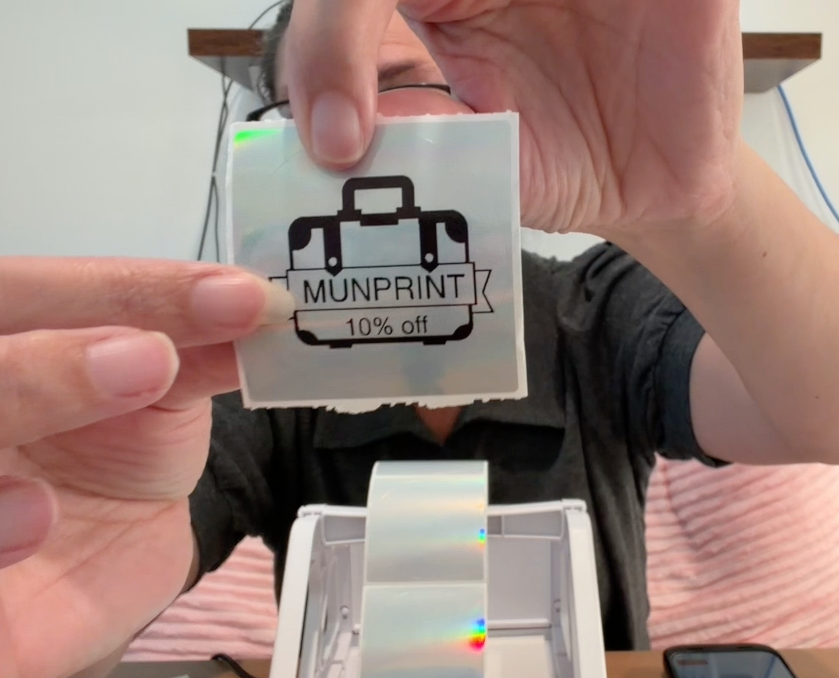
This is where the MUNBYN RW403B surprised me the most. I expected a basic label printer that spits out shipping labels — and it does that well. But the versatility goes way beyond that. Using the Munbyn Print app and their holographic circle stickers, I designed and printed a custom coupon code sticker for my brand in minutes. The templates made it easy to lay out the design without starting from a blank canvas.
I also tested MUNBYN’s holographic circle stickers and their label and sticker holder alongside the printer — both are solid accessories if you’re going all-in on a labeling setup. The sticker holder keeps your rolls organized and feeds smoothly, and the holographic stickers give everything a premium, eye-catching finish.
Pros and Cons
Pros
- Five-minute Bluetooth setup — no drivers, no hassle
- No ink or toner needed — thermal printing saves money long-term
- App templates are actually useful, not just filler
- Surprisingly versatile — shipping labels, custom stickers, barcodes, product labels
- Compact at 3.3 lbs — doesn’t take over your workspace
- Works with major shipping platforms: FedEx, UPS, USPS, Amazon, Shopify, Etsy, eBay
- Sharp print quality with clean barcode scanning
Cons
- Monochrome only — no color printing (thermal limitation, not a MUNBYN issue)
- Bluetooth only for mobile — USB required for desktops without Bluetooth
- The app could use a few more advanced editing features for detailed custom designs
Who Is This For?
If you ship products — Etsy, Amazon, eBay, Shopify, or even just returning packages regularly — a Bluetooth thermal label printer eliminates the hand-writing-and-taping routine. Small business owners, home organizers who want clean pantry and storage labels, and content creators who ship products will get the most out of this.
If you only ship a package every few months, the $80 investment might not make sense. And if you need color labels, thermal printing isn’t the answer. But if you’re printing labels regularly, the math works out fast — no ink cartridges to replace, ever.
Final Verdict — Is the MUNBYN RW403B Worth It?
At $79.99 — or about $72 with the MUNPRINT discount code — the MUNBYN RW403B is a solid investment for anyone who prints labels regularly. The Bluetooth setup is genuinely painless, the print quality is sharp, and the app templates make it way more versatile than I expected going in. I came into this MUNBYN RW403B review thinking it was just a shipping label printer, and I left making custom holographic brand stickers. That’s the kind of surprise I like.
Buy the MUNBYN RW403B Bluetooth Label Printer on Amazon →
💰 Use code MUNPRINT for 10% off!
Check out the full MUNBYN store on Amazon for more label printers and accessories.
Want to see more real product reviews? Browse the Hassle Free Reviews storefront or check out our other office product reviews.
Frequently Asked Questions
Does the MUNBYN RW403B need ink or toner?
No. The RW403B is a thermal printer — it uses heat to print on thermal paper. No ink cartridges, no toner replacements, no ongoing supply costs.
Can I print from my phone?
Yes. The RW403B connects via Bluetooth to both iPhone and Android. Download the free Munbyn Print app to design and print labels wirelessly.
What size labels does it support?
Print width ranges from 1.57″ to 4.25″, which covers standard 4×6 shipping labels as well as smaller sticker and barcode sizes.
Does it work with FedEx, UPS, and USPS?
Yes. It’s compatible with all major shipping platforms including FedEx, UPS, USPS, Amazon, Shopify, Etsy, and eBay.
Is there a discount code?
Yes — use code MUNPRINT at checkout for 10% off. Get the MUNBYN RW403B here.